Lets Find out Which is the best? There are many phones around the world which run on Android. But there are only some which are
Read more: http://www.goandroid.co.in/#ixzz1td0E6eCQ
With the launch of the much awaited Android 4.0 Ice cream sandwich operating environment for smartphones, the top mobile companies are cashing in on its hype by releasing their phones in the beaming market.
HTC has revealed its initial upgrade plans for Ice Cream Sandwich, confirming that the new HTC Vivid along with most of the company’s other recent high-end devices will get Android 4.0. According to HTC, the Sensation, Sensation XL and Sensation XE will all get ICS upgrades, along with the HTC Rezound, HTC EVO 3D, HTC EVO Design 4G and HTC Amaze 4G.
The actual upgrade process itself won’t kick off until early in 2012, giving HTC’s engineers time to get the platform up to speed with their hardware. It’s unclear at this stage what HTC will do with Sense, the company’s custom interface, but the assumption is that HTC will continue to reskin Android even on Ice Cream Sandwich. HTC says it is “continue to assess” its range to see what other existing devices can handle an Android 4.0 upgrade, and will release more specific timescales soon. Samsung announced its own Ice Cream Sandwich update plans late last month. More on Ice Cream Sandwich in our Google Q&A.
“HTC knows how excited our fans are to get their hands on Google’s latest version of Android, Ice Cream Sandwich, so we’re thrilled today to announce the first wave of HTC phones that will receive upgrades: We can confirm the brand new HTC Vivid is upgradeable to Ice Cream Sandwich. In addition, Ice Cream Sandwich is coming in early 2012 to a variety of devices including the HTC Sensation, HTC Sensation XL and HTC Sensation XE, as well as the HTC Rezound, HTC EVO 3D, HTC EVO Design 4G and HTC Amaze 4G through close integration with our carrier partners. We’re continuing to assess our product portfolio, so stay tuned for more updates on device upgrades, timing and other details about HTC and Ice Cream Sandwich.”
The HTC Vivid has the distinction of being one of the first phones to take advantage of AT&T’s fledgeling LTE network, a feature it shares with its launch partner the Samsung Galaxy S II Skyrocket. But the Vivid isn’t relying on a single bullet point to make its purchase case – the dual-core Gingerbread phone has some high-end specs and a huge 4.5-inch qHD screen. Does the high-end featureset and a fancy new network connection make the Vivid a worthy buy?
Hardware The first thing you notice upon picking up the Vivid is its heft. The thick plastic and metal construction makes it tip the scales at 6.24 ounces, about 30% heavier than phones of the same general dimensions from Motorola and Samsung. The weight gives the phone a definite high-end feel, but what it also gives is, well, weight. It’s up to you whether or not that’s an important statistic, but after carrying the Vivid around in my pocket for a few days, I was definitely wanting a lighter phone. The phone has a distinctly angular style that’s accented by a full metal backplate. Slide it off and you’ll find a SIM card slot with a fancy new AT&T 4G LTE mini-SIM, and the battery, which must be removed to access the empty MicroSD card slot. The slim and unfortunately weak back speaker sits on top of the 8 megapixel rear camera, which is paired with a sharp 1.3 megapixel front shooter. The left side of the phone holds a standard MicroUSB port, the right a silver volume rocker and the top the power button, all without error or complaint. HTC’s standard capacitive buttons reside below the screen. The screen itself is a standard TFT LCD. It’s sharp and clear, even at the high end of the size scale for Android phones. Unfortunately the brightness and viewing angles aren’t anything to write home about – for that you’d be better to look to the Skyrocket’s Super AMOLED panel – but resolution junkies will be happy. Reading and video were a little dark for my tastes. 16GB of internal memory should be enough for most, and those who require more can expand with MicroSD. Inside the retail packaging you’ll find nothing but a wall-wart and a USB charge/data cable. Over several days I had no issues with any of the hardware, include Bluetooth, which can sometimes be picky on HTC phones. The only real complaint I have besides the weight is that the all-metal back is unfinished, with the exception of an HTC logo and some grip dimples. It makes the phone all too easy to scratch, so expect the back to start looking considerably worn after a few weeks. Software HTC Sense is in its Sunday best on the Vivid. There’s nothing really to say in addition to what’s already been said on the software. On the generous 1.2Ghz dual-core processor there’s no noticeable slowdown on the homescreen or when switching between apps, and heavy-hitting tasks like Flash, Netflix and the like don’t phase the phone at all. AT&T’s standard bloatware load is here, but unlike some recent phones including the Skyrocket, none of it can be removed – bummer. Still, to HTC’s credit it doesn’t appear to slow things down. If you’re tempted by the prospect of LTE, you probably want the latest and greatest software as well, and I’m happy to report that AT&T has confirmed the Vivid will be getting a tasty scoop of Ice Cream Sandwich. The upgrade won’t come until the spring of next year however, probably owing to HTC’s Sense skin itself. You take the good, you take the bad, you take them both and there you have… manufacturer customizations. Until then, Gingerbread will have to satisfy. Phone, Data and Battery If you’re lucky enough to live in one of AT&T’s LTE coverage areas, you’re in for a treat. Even with only three bars of LTE I got 16-18Mbps down consistently. That’s likely to lower over the next year, but for now, the network is under low stress and you should see some great performance. Standard 3G/4G reception seemed in line with other AT&T phones.For a more in-depth look at the LTE network, check out our data speed tests. Call quality was generally good, with one exception. The front speaker had some volume issues, and combined with a few long calls in the low-coverage area around my home, talking became a chore on more than one occasion. If you generally stick to AT&T’s four or five bar locations – like pretty much all of their major metro LTE coverage zones – you should be fine. If you’re in the habit of traveling outside of major cities, voice performance may suffer. The 1650Mhz battery seems to do well on standard operations like browsing and music playback – if you never turned the phone off you’d think it was great. Unfortunately the standby performance isn’t as great. Without some careful management of apps and usage, you’re probably not going to see a full day’s use out of the Vivid, and that’s doubly true for LTE users. Media The camera and video were typical of HTC’s later offerings, good but not great. In bright lighting your shots will be clear and distinct, but indoors or after sundown you’ll see a familiar fuzzy lines and muted colors. On the plus side, the 1.3 megapixel front camera was noticeably sharper than others, or so I was told from the other end of the phone line. Wrap-up If you’re a fan of HTC’s solid design, you’ll like the Vivid. Some cutting-edge internals and access to LTE speeds doesn’t hurt, but a sub-par battery and weak speakers do. Still, at a new lower price of $99.99 on a new contract, it’s a great deal for a fast, big-screened phone, even if the screen itself is merely OK. Make sure and get your hands on a Samsung Galaxy S II Skyrocket before making your final decision.
When AT&T announced its first smartphones to take advantage of its new fancy-pants LTE network, a few balked at the $199 and $249 prices for the HTC Vivid and Samsung Galaxy S II Skyrocket, respectively. Well, rejoice bargain hunters: the price for each has dropped by a cool $100. That makes the Vivid just $99.99 and the Skyrocket $149.99 – not bad for a pair of phones with specs that are just shy of the top of the line.
AT&T didn’t give a reason for the price drop, but it’s likely that a lot of people weren’t thrilled at the prospect of paying a considerable premium for LTE. After all, the LTE portion of the network still only extends to a handful of metro markets, and if you don’t live in one, a modest bump up from other Android phones like the Galaxy S II and Inspire 4G doesn’t really warrant the increased price. Curiously, the reduction makes the Galaxy S II Skyrocket $50 less than the plane-Jane version of the Galaxy S II. If you’re an AT&T customer who wants a GSII, there’s no reason not to go with the Skyrocket. The price drop is currently only showing up on the online phone pages themselves – for some reason, the price drop isn’t showing up on the generic Smartphone page. That might mean that the deal isn’t for retail stores, or that it’s simply a promotional price. Either way, they’re great deals, assuming that you’re in the market and your 2-year contract is up.
So you’ve got this webpage over at Motorola that’s telling you all about the new Dick Tracy watch, aka the MOTOACTV, a sports-centric Android device made to wear on a strap around your arm or wrist. It looks fantastic, but you want a guide from an Android perspective, one that’ll let you know exactly what this device is and how simple (or incredibly difficult) it’ll be to use. We just happen to have a guide like that here! And after the guide we’ll have a full review of the device as well!
Full disclosure, the following guide is essentially re-written from a reviewer’s guide made for those taking a look at the MOTOACTV before consumers get their hands on it. What I’m aiming to do here is to write it in a style that’ll make it both simple to understand and readable in a shorthand format so that you can get the idea of what’s going on without committing to reading the bible of MOTOACTV, if you know what I mean.
Preparation of the device
This isn’t the kind of device you can just pop out of the box and start running with, but it’s close, and with only a few screens grabbing your weight, age, gender, and time zone. After entering these values, you could potentially jet out the door BUT you should of course do a few things like making sure its fully charged and that you’ve got it correctly attached to the accessory of your choice. With the basic package you’ll get the MOTOACTV itself in either an 8 or 16GB version, this telling you how much space you’ve got inside for things like MP3 music tracks, as well as a charger (with 2 USB out ports, neat!), USB cord, a clothing/belt clip, Motorola SF200 stereo headphones with built-in mic, and a guide book. After that you’re able to purchase the following: Clip (included but available for purchase if you lose yours) SF200 headphones (ditto) Sports Wrist Strap Sports ArmBand Bike Mount Lucky for you, our review will contain all of these items because we’ve got the super deluxe awesome reviewers package, complete with biker dude/Gene Simmons box!
Interface
Once your device has been set up, you’ll notice five home screens, the main and center screen being the Timepiece Screen, this you’ll recognize by the giant digital time display as opposed to a big red icon in each of the other screens. The five screens are as follows, from left to right: Settings – This area allow you to re-address anything you want to change that you set in the original setup as well as items like metrics, Audio Coach if you want to be spoken to during your run on how well you’re doing with pace, split time options, workout customization, and you can even turn the Timepiece into a scary looking hardcore skull. I expect that further customizations of interface will be introduced over time as well – you also have the ability to change your theme from Fire to Blue Sky or Steel *unfortunately “Blue Steel” is not yet an option – soon! Workout – Here is where you start your activity. From here you can select items like Running, Cycling, Elliptical, and more. See additional information on this screen in the Working Out section below. Timepiece – The center screen displays the current time as well two items that start calculating each midnight and reset each midnight: steps and calories burned. The device uses a couple of built-in items: GPS and an accelerometer, to track how many steps you’ve gone in a day. MOTOACTV also has Bluetooth certified with *ANT+ which, as Motorola states, “enables compatible fitness equipment, like heart rate monitors, bike speed/cadence/power sensors, and foot pods, to communicate directly with your MOTOACTV using a low-power wireless protocol.” Back in settings is where you’ll be hooking your MOTOACTV up with anything from foot pods to power sensors to heart rate monitors, collecting data from these devices then via Bluetooth. Music – This is where you’ll control your music, of course, this separate from your workout so that you can manage the two independent from one another. You’ll be adding music to your device via an application that you’ll find available to add to your computer (your home computer, Windows or Mac,) which will work to load music as well as unload data if you wish to avoid MOTOACTV.com – more on that later. You can also get FM radio right from the device itself using your headphone plug as an antenna. The most awesome part about music is that MOTOACTV compiles data and attaches it to your music, this data then harvested to create one “high-performance playlist” of songs that’ve statistically made you move faster, and with more stamina than the others in the past. Notifications – On the right is the last screen, this one working with your smartphone. If you do not want to use a smartphone in tangent with your MOTOACTV, you don’t have to – isn’t that neat? The device will of course be promoted as one that works to bring your smartphone to a whole new level, of course, here connecting not only to show you any notifications you have on that device, but letting you access calls, text messages, and calendar reminders as well.
Smartphone integration with MOTOACTV by Sanjay Jha
MotoCast USB
To help you load your favorite music to your device, Motorola has included an application by the name of MotoCast USB. You can access this application by plugging your MOTOACTV into your computer with its USB cord. You’ll either be prompted to install immediately, or you’ll have to search for it – Mac users it’ll be on your desktop or amongst your plugged-in media, Windows users you’ll have to go to My Computer, MotoCast Drive, and MotoCastSetup.exe. Make it happen from there and poof! The application appears. You’ll need to either create a MotoCast ID if you don’t already have one or just log in from here, at which point you’ll be ready to go for loading music and all kinds of other fun stuff from MOTOACTV.com to your device. From this point you can either continue to plug your MOTOACTV in to your computer to connect to MotoCast USB or you can set your MOTOACTV up to connect with your computer via Wi-fi – should both your MOTOACTV and your computer be connected to the same Wi-fi network, you’ll be in business for completely wireless syncing of media and data.
MOTOACTV.com
At the website MOTOACTV.com, you’ll be able to access your MOTOACTV device-generated statistics with your MotoCast ID. Your statistics only upload to Motorola’s servers if you connect your MOTOACTV to a Wi-fi network and you’ve signed in with your MotoCast ID on the device as well. This site is one of the big selling points of the device, but again, just like the smartphone bit, you don’t need to connect to use the device on its own. With the site you’ll be able to access the following: Workouts – Each time you start and end an activity, it will be registered in your Workouts, complete with pace, distance, calories burned, and if your workout was outdoors, a map of your workout route. There’s also a place to add journal notes to your workouts – for when you need to know that this was the day that you ate the cheeseburger before going on that hike that ended badly. Planning – Here you’ll be able to set up a workout plan on a big calendar, each workout date then given to you as a reminder on your device should you later load the information in to the hardware. There’s also maps of the USA, Canada, Mexico, Brazil, and Argentina connected to training plans and tips from fitness experts like Chris Carmichael that you can use if you’ve got no idea where to start. Goals – Just as the title implies, this is the place where you can set goals for your fitness, these goals then tracked via your workout routine loaded into the site with your device. Goals include weight loss, workout frequency, and stamina. Competition – As users from across the country join the fun here with MOTOACTV.com, you’ll be able to compete against one another in competition. You can also connect with your friends and family through their accounts and have one big MOTOACTV social running network! This is clearly the goal, anyway. Settings – Here’s where you can create a profile including photo and personal stats, adjust your privacy settings. You can also manage your MOTOACTV device from this area of the website and explore your Fitness Zones and maps (which you can customize yourself.)
Working out
From your Workout screen you’ll be able to select from any of the following: Running, Cycling, Walking, Elliptical, and Step Machine. You can also select “recent” which shows what you’ve done recently as far as workouts and can select “race myself” if you’d like to improve. Before you start anything though, once you’ve selected what you want to do, you’ll want to calibrate your device – this option will come up as you start your activity and will take you about 2 minutes. You’ll want to make sure your GPS is locked, this taking just a few seconds depending on where you are in the world, or that your accelerometer is working well (this mostly for when you’re indoors.) Inside a workout you’re able to see your live data screen which can show things like pace, hour, elevation, and calories. You can adjust what you see here in your settings on the device by heading to Settings, Workout, Customize Views. You have the option of adding an Audio Coach which will speak to you on your important stats like time, calories burned, and heart rate, each of these only when you tap your MOTOACTV display for an update. No worries about nagging!
Hardware Features
A few other items exist for the MOTOACTV which aren’t really categorizable under the software end of the device and that we’ll be reviewing in kind here on the site. They are, in no particular order: Display – what you’ve got here is an a 1.6-inch LCD capacitive display on a device that is 1.81 x 1.81 x 0.38 inches large, and the screen is no ordinary bit of tech – instead what you’ve got here is a transflective display which, as Motorola says, “turns black and white in direct sunlight.” We’ll be checking that out for sure! Toughness – Motorola notes that the entire MOTOACTV is both scratch resistant (and it certainly is as it’s got Gorilla Glass across the front) and water resistant. They literally suggest that we “Take it for a test drive during a rain storm” and “Take it to your gym for an all-out sweat fest on the treadmill.” We’ll do a bit of that testing as well, though I can’t promise an all-out sweat fest, as it were. Seeya here soon for the full review of the device!
The Samsung Galaxy Nexus still doesn’t have an official date or price from Verizon Wireless, to the consternation of impatient Android fans everywhere. But between the latest news out of Costco and various other leaks, it looks like we can be pretty sure of the general price. A look into Costco’s internal database shows the Galaxy Nexus at a price of $289.99, with zero current stock and no release date in sight. That lines up closely with the $299 leak out of Verizon itself.
Sadly there’s no indication of when the Galaxy Nexus will be coming to the big-box retailer. The appropriate field in the database is left as “N”, which we assume means “not applicable”. The version that will be showing up in Costco is the Verizon model, so those of us on AT&T or T-Mobile can hold on to our three bills for a while longer. Previously a look at Verizon’s internal system showed the Nexus launching with the new HTC Rezound on November 10th for $299. While the dates for both have obviously slipped, there’s no reason to think that the price is wrong considering that the Rezound has already matched up. Europeans in various territories will get a chance to buy the Galaxy Nexus on November the 17th, and according to an even more recent Verizon leak, that may indeed be the case for the US as well. An advertising calender showed the Nexus and a general Samsung campaign beginning after Thanksgiving, but we’re hoping choosing to believe that that’s simple a schedule for their nationwide media rollout. Come on, Verizon, get the lead out – won’t you take my money already?
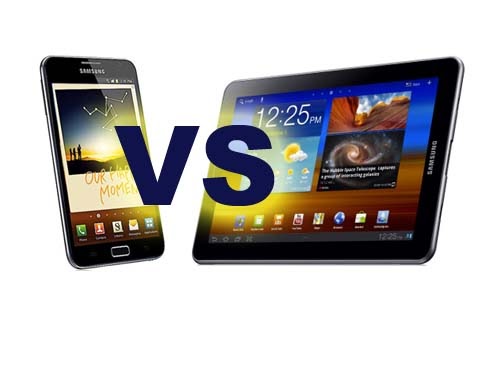
We pit Samsung's new 5.3-inch Galaxy Note smartphone against it's larger cousin, the Samsung Galaxy Tab 7.7
Form The Galaxy Tab has two faces really, on the screen side you’ve got a stylish shiny black bezel which is evenly spaced round the whole display for a very clean look. Turn the device over and you’re presented with a much more raw looking surface of brushed silver-coloured aluminium. Either way you flip it there’s not a lot of noise or disruption going on, Samsung has kept visual clutter to a minimum and the shape is appealing to the eye as its corners are neither too soft nor too angular. The Galaxy Note immediately looks good thanks to a super thin bezel along two of its edges – a design feature which in our view makes for instant visual flair when applied to any gadget with a screen. The back panel is particularly nice thanks to a slight curvature and a textured surface, apart from this just like the rest of Samsung’s designs it is quite minimalist, which is a look that works well here. We think both devices look equally good. Winner - Draw
DisplayBoth devices feature Samsung’s own Super AMOLED technology for their displays, although it should be noted the Galaxy Tab 7.7 uses the upgraded Super AMOLED Plus version while the Galaxy Note is on the brand new Super AMOLED HD variant. The Galaxy Tab 7.7 has a cunning clue in its name regarding the size of its capacitive touchscreen, with a 7.7-inch display and an 800x1280 pixel resolution, the Galaxy Tab sports a pixel density of 196 pixels-per-inch (ppi). It’s loaded with Samsung’s TouchWiz UX user interface (UI), supports multi-touch and is fitted with an accelerometer and gyro sensor for screen rotation. Samsung’s rather large smartphone, the Galaxy Note, has a slightly smaller capacitive touchscreen at 5.3-inches, made from Gorilla Glass and with multi-touch support. A modified TouchWiz 4.0 UI is pre-installed and allows for things like split screen menus and app screens, as well as supporting the innovative S Pen stylus included with the device. It also has accelerometer and gyro sensors built in. Screen resolution is the same as the larger Galaxy Tab 7.7, but the smaller size means a higher pixel density of 285ppi. The Galaxy Note’s display is our first choice here thanks to the unique S Pen stylus support and interface tweaks which really make the best use of the vast screen space. Not only that, but it also has a much higher pixel density and the added bonus of superior Super AMOLED HD. Winner – Samsung Galaxy Note
StorageSamsung’s 7.7-inch tablet has three internal storage options for 16GB, 32GB and 64GB of space, each with 1GB of RAM and microSD support up to 32GB. The Galaxy Note is similar, the only difference is it doesn’t have that top-end 64GB onboard storage option. The Galaxy Tab 7.7 wins this round by having more storage to play with. Winner – Samsung Galaxy Tab 7.7
Processor Processor setups on these devices are identical – each has a 1.4GHz dual core ARM Cortex A9 processor on the Exynos chipset and running a Mali-400MP graphics processing unit (GPU).
Winner - Draw
Operating System These are both Android devices, the Samsung Galaxy Note runs Gingerbread 2.3 while the larger Galaxy Tab 7.7 uses the tablet-specific 3.2 Honeycomb build.
Gingerbread is generally showing its age now compared with other operating systems and indeed subsequent Android builds currently on the market.
What is commendable is the multi-tasking and app management capabilities, as well as the performance, which is fantastic on the Galaxy Note.
Apart from this it feels a little lacking in features, the browser doesn’t have tabs which is just plain odd.
However, with the interface modifications made by Samsung specially for the Galaxy Note there’s a lot of interesting stuff happening here.
Web pages are viewed full size and most native app menus and interface features include split screen modes. Generally Samsung has tried to make the best possible use of the vast screen space.
It also has some nifty tricks with the S Pen, including a double-tap Memo feature and a quick-swap overlay to allow you to make notes on top of web pages and documents.
Honeycomb’s native state feels more complete than Gingerbread. Performance wise we’d say it’s on a similar level to Gingerbread, particularly as both devices are equally powerful, you’re probably not going to notice a difference as both will be smooth.
It also features the same great multi-tasking and app control capabilities, but actually has a much better quick app switching feature built into the interface.
One really annoying thing is the touch keyboard, because although it’s good there’s a key to close it right next to the key used to toggle between letters and numbers.
We’re sure you can imagine how frustrating it is to repeatedly have your keyboard close in the middle of typing.
Apart from this, we’d say Honeycomb is better. The Galaxy Tab wins.
Winner – Samsung Galaxy Tab 7.7
Camera Tablets are often slightly lacking in the camera department and sadly this is also the case with the Samsung Galaxy Tab 7.7.
It packs a 3.15-megapixel primary camera at 2048x1536 pixels and capable of 720p video capture.
It’s video call-friendly and also sports a 2-megapixel secondary camera on the front.
Features include geo-tagging, autofocus and an LED flash.
The Note is far better equipped, but then it is one of Samsung’s top-of-the-range smartphones even if it is approaching tablet size.
It uses an 8-megapixel primary camera at 3264x2448 pixels able to record video at 1080p. It also boasts a 2-megapixel secondary camera with video calling capability.
It’s also loaded with more features than its larger cousin, it has the same LED flash, geo-tagging and autofocus, but stacked on top is touch focus, image stabilisation, multi-shot, face and smile detection and panoramic capture mode.
The Galaxy Note has a clear victory when it comes to cameras.
Winner – Samsung Galaxy Note
Final Thoughts We’d say overall these are fairly evenly matched devices, particularly when you boil it down to the bare bones with things like the processor setup.
The Galaxy Note has a better camera, a better display and the delights of the unrivalled S Pen stylus.
Meanwhile the Galaxy Tab 7.7 has superior storage capabilities, at least if you buy the 64GB version, and a better ‘vanilla’ operating system.
Though it must be said Samsung’s revamp of Gingerbread for the Galaxy Note is some very persuasive stuff indeed.
The most important thing is that the smaller size, portability and S Pen stylus on the Galaxy Note mean it is a totally different experience from the Galaxy Tab 7.7, which is at the end of the day a regular 7-inch tablet, albeit a rather good one.
All of you lucky ASUS Eee Pad Transformer owners should be happy to know an OTA update is hitting devices today. No, this is not Ice Cream Sandwich sadly but there are a few changes and improvements and so far we are hearing good things. The Transformer was updated to Android 3.2.1 Honeycomb late September, the latest version of Honeycomb and today that hasn’t changed but we do have build version 8.6.5.18 in a small incremental update.
So far ASUS has been mighty impressive with the amount of updates, and the speed at which they’ve brought them. According to sources the new update brings a slew of performance enhancements, bug fixes, and apparently a new app backup implementation. Apparently non ASUS apps can be backed up and restores to another ASUS tablet so users wont lose that all important game data and progress on Angry Birds, or anything else for that matter. Here is a list of updates according to the ASUS Facebook page. Right at the top you’ll see the new App backup, and that the popular Netflix comes pre-installed. Sadly this is the recently updated version of Netflix only and we still don’t have an official Honeycomb tablet UI. There are some major improvements to battery consumption especially while using the dock, along with some Wi-Fi improvements. Then we have tons of applications that have been updated in this latest OTA update but all of that is listed above. The new OTA update for the ASUS Transformer should be hitting devices over the next few days. As always, users can manually go into settings > about tablet > and check for updates themselves should they not want to wait for an OTA notification. Enjoy the latest update and feel free to let us know how things go in the comment section below. I can’t wait for the Transformer Prime myself, especially with the awesome update history ASUS has shown thus far.
We still don’t know a whole lot regarding the new LG Prada K2 smartphone but apparently its already hitting the FCC this week. This ultra-thin device codenamed the P940 is the third iteration of the Prada name and won its FCC approval today and could be headed to markets soon with Android 2.3 Gingerbread.
It was first spotted in the wild late last month in a few leaked photos looking very sleek and actually quite nice. Rumors have it to be packing a 4.3″ 1280 x 720p HD display and possibly a dual-core processor but for now those details are still under a lock and key because the FCC filing sure didn’t reveal much. One thing we did learn, the LG Prada K2 should be rocking some NFC capabilities whenever it comes to the market, but we still aren’t even sure it will see a US launch. In the rest of the leaked photos linked to above we see an ultra-thin design, a front facing camera and what we are hearing is also an 8 megapixel shooter around back. LG has used Qualcomm chipsets in the recent past and we are expecting a similar 1.5 GHz dual-core processor on board here like many recently released HTC smartphones — but again that has not been confirmed. Packing GSM/EDGE bands 850 and 1900, as well as the 1900 WCDMA band. It is also only 8.8mm thin so should be giving the Galaxy S II a run for its money. When we hear or find more details we’ll be sure to update. Head to the source link below if you’d like to dig through the filings yourself. [via Wireless Goodness]


 6:19 PM
 Simranpal SIngh




 Chinese
 French
 German
 Italian
 Japanese
 Korean
 Russian
 Spanish
